The right ergonomic setup should adapt to your body, support frequent movement, and stay comfortable through a full workday.
When people shop for an ergonomic office chair, they often compare lumbar support, seat depth, backrest recline, and adjustability. But one detail deserves a closer look: the armrests. They are a frequent point of contact during a workday, and their shape, height, width, and positioning can all influence how supported your arms feel.
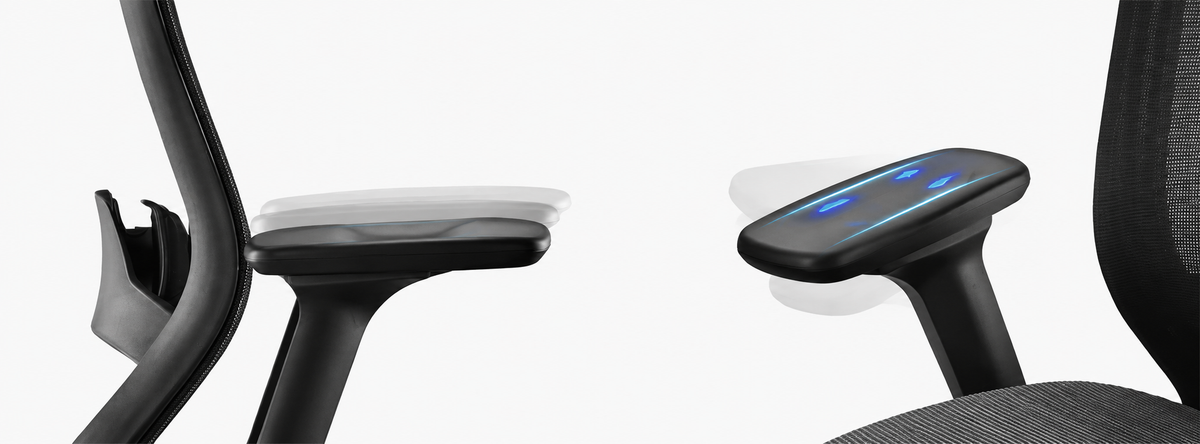
At OdinLake, looking across our chair lineup led us to an interesting design observation: our armrests do not all share the same top profile. The OdinLake L3 FlexBreath features a subtle micro-concave surface, while other OdinLake chair designs use a gently raised, convex-style profile. Neither shape should be treated as universally better. They represent two different approaches to the same everyday design question: how can an armrest provide a comfortable place for the arms without getting in the way of natural movement?
Why Office Chair Armrest Design Matters
Armrests are not simply accessories attached to a chair. When positioned well, they can provide a place to rest the forearms and help reduce the need to hold the arms unsupported while sitting. When positioned poorly, they may feel intrusive, push the shoulders upward, encourage the elbows to move too far outward, or prevent you from getting close enough to your desk.
That is why ergonomic chair armrests should be considered as a complete design rather than judged by shape alone. The surface contour matters, but so do armrest height, width, depth, padding, adjustability, and the relationship between the chair and the user's desk.
Concave vs. Convex Armrests: What's the Difference?
The terms describe the general profile of the armrest's top surface. A concave surface has a shallow dip through the middle, while a convex surface gently rises through the middle. The depth and radius of the curve matter: a subtle contour feels very different from a deep channel or a pronounced ridge.
Concave Armrests
A concave armrest has a gently recessed center. Depending on its depth, width, padding, and the user's arm position, this shape may create a lightly contoured resting area. A very shallow dip can feel quite different from a deep groove that strongly guides or confines the forearm.
For that reason, it is not accurate to assume that every concave armrest will cause pressure or that every user will find one uncomfortable. The important questions are whether the contour matches the user's forearm, whether contact feels evenly distributed, and whether the arm can move freely when the user changes tasks.
Convex Armrests
A convex armrest has a gently raised center and a more rounded top profile. Some users may prefer this more open-feeling surface because it does not create a recessed area for the arm to settle into. However, a raised center that is too pronounced or too firm could also create a concentrated contact point.
As with concave designs, the word “convex” alone does not tell you whether an armrest will be comfortable. The overall dimensions, material, edge radius, padding, and fit with the user's body all matter.
What Actually Makes an Ergonomic Chair Armrest Comfortable?
Instead of choosing an armrest based only on whether it is concave or convex, consider these practical factors:
- Contact area: The surface should offer enough room for comfortable forearm contact without forcing the arm into one narrow position.
- Surface contour: Curves should feel gradual rather than creating a sharp ridge, deep channel, or obvious pressure point.
- Padding and material: Surface firmness and texture affect how the armrest feels during repeated contact.
- Height adjustment: The armrests should allow the shoulders to stay relaxed, rather than making you shrug or reach downward.
- Width and depth: The position should let your elbows stay comfortably near your body and allow you to move close to your desk.
- Freedom of movement: Your forearms should be able to shift naturally between typing, mouse use, reading, and resting.
A useful starting point is to adjust the armrests so your shoulders feel relaxed and your elbows remain near your sides. Your forearms can rest lightly when support is helpful, but the armrests should not force your arms into a fixed posture. Check the setup at your actual desk, because desk height and keyboard position can change how the armrests feel.
OdinLake's Armrest Design Observation
When we reviewed the armrest shapes used across OdinLake chairs, we noticed two distinct profiles: the L3's subtle micro-concave surface and the gently raised surfaces found on other models in our lineup. This is an observation about our product designs, not a claim that one profile is scientifically superior or more comfortable for every person.
OdinLake L3: A Subtle Micro-Concave Armrest
The OdinLake L3 FlexBreath Ergonomic Chair uses a shallow, micro-concave contour rather than a deep recessed channel. The distinction is important: the surface has a slight shape, but it is not designed to lock the forearm into one position.
The L3 also offers adjustable armrest positioning and a flip-back design. These features give users more flexibility to position the armrests around their desk setup or move them aside when they need extra room. For someone who alternates between keyboard work, mouse use, and other activities, adjustability can be just as important as the surface profile.
Gently Raised Armrest Profiles Across Other OdinLake Chairs
Other chairs in the OdinLake range use a gently raised, convex-style armrest profile. This creates a different surface feel from the L3's shallow dip. Rather than presenting one shape as the winner, we see these profiles as different design choices within a lineup built for people with different preferences and workstation habits.
You can explore other designs in the OdinLake L1, OdinLake L2, OdinLake O2, and OdinLake O3 product pages.
Who May Benefit From Paying More Attention to Armrest Shape?
Armrest fit is especially worth checking if you spend long periods at a desk, switch frequently between a keyboard and mouse, have a compact workstation, or find that your current chair's armrests interfere with your desk. People with shorter or longer forearms may also notice that the same armrest feels different depending on where the contact point falls.
If you work in a small space, features such as armrest depth adjustment or a flip-back mechanism can help you move the chair closer to the desk or create more room when the armrests are not needed. If you change tasks throughout the day, a surface that allows comfortable repositioning may matter more than a particular curve.
There is no single armrest shape that suits every body or every workstation. The best choice is the one that fits your dimensions, supports a relaxed working position, and does not restrict natural movement.
How to Test Office Chair Armrests Before Choosing a Chair
- Set up your normal desk position. Adjust the chair and desk as you would for a typical work session.
- Relax your shoulders. Raise or lower the armrests until your shoulders are not lifted or pulled downward.
- Check forearm contact. Notice whether the surface feels evenly supportive or creates a distinct pressure point.
- Try your usual tasks. Type, use your mouse, and reach for nearby items. The armrests should not block natural movement.
- Change positions. Shift your arms slightly and check whether the surface remains comfortable instead of forcing one fixed placement.
- Recheck desk clearance. Make sure the armrests do not prevent you from sitting close enough to your keyboard and desk.
Pay attention to comfort over a normal period of use, not just the first few seconds in a showroom. If you experience persistent pain, numbness, or tingling, stop using the position that causes it and consider seeking advice from a qualified healthcare professional.
Frequently Asked Questions About Ergonomic Chair Armrests
Are concave armrests better than convex armrests?
Not automatically. Concave and convex describe surface shapes, not a guaranteed comfort level. The depth of the curve, padding, armrest dimensions, adjustment range, and individual fit all influence the experience.
Can a concave armrest put pressure on the forearm?
It can feel uncomfortable if the contour is too deep or narrow for the user's arm, but a shallow concave surface does not automatically create harmful pressure. Fit and real-world comfort matter more than the label alone.
Should my elbows stay on the armrests while typing?
Armrests can provide support when resting, but they should not force your elbows into a fixed position or prevent you from moving naturally. Keep your shoulders relaxed and adjust your workstation so your arms can move comfortably while typing.
How high should ergonomic chair armrests be?
Start by adjusting them so your shoulders remain relaxed and your elbows are comfortably near your sides. The right setting depends on your body, desk height, and keyboard position, so check the fit at your own workstation.
What should I look for when buying an office chair with adjustable armrests?
Look at height, width, depth, surface size, padding, and whether the armrests can move out of the way. Consider the armrest shape as one part of the overall fit rather than the only deciding factor.
A Small Design Detail, Considered From Different Angles
Armrest shape may seem like a minor detail, but it is one of the places where a person and a chair meet throughout the day. Our observation across OdinLake designs is simple: the L3 uses a subtle micro-concave surface, while other OdinLake chairs feature gently raised armrest profiles. Both approaches deserve to be considered in the context of fit, adjustment, and the way each person works.
If you are comparing ergonomic office chairs, look beyond the shape alone. Check how the armrests fit your forearms, whether your shoulders can relax, and whether you can move naturally at your desk.
Explore the OdinLake L3 FlexBreath Ergonomic Chair and take a closer look at its subtle micro-concave armrests and adjustable design.
About OdinLake
OdinLake explores the details that shape everyday sitting, from adjustability and support to the small design choices people notice during long workdays. Through OdinLake Insight, we share our product design observations and practical guidance to help people make more informed decisions about their workspace.