A condition-based method for deciding whether a standing desk mat is useful, choosing a stable design, placing it safely, and running a controlled trial.
The right ergonomic setup should adapt to your body, support frequent movement, and stay comfortable through a full workday.
You do not automatically need an anti-fatigue mat just because you use a standing desk. Consider one when you stand on a hard floor and ordinary standing sessions repeatedly become uncomfortable even after the desk height, footwear, and sit-stand routine are workable. Skip it when the current surface feels stable and comfortable, or when a mat would obstruct the chair, desk, doorway, or walking path.
The useful test is not whether a mat feels soft for ten seconds. It is whether a specific mat improves a repeatable work session without making balance, movement, or the sit-to-stand change harder. A mat is one adjustable part of the workstation, not permission to stand still for the whole day.
Make the decision from your actual floor and work pattern
Start with the condition you can observe. The same mat can be useful on hard tile in a dedicated standing zone and unnecessary on a resilient floor where standing already feels acceptable. A mat that works in an open office can also be awkward in a compact home workstation if it blocks a chair caster or becomes a trip edge.
| Current condition | First action | Mat decision |
|---|---|---|
| Hard, unyielding floor; feet or lower legs become uncomfortable during normal standing tasks | Check desk height, footwear, and how long you remain still | Trial a stable anti-fatigue mat if the problem remains |
| Resilient floor or carpet; standing sessions already feel stable and acceptable | Keep the current setup and continue changing position | No purchase is required unless a specific problem appears |
| Discomfort starts because the desk is too high or low | Correct the work-surface relationship first | A mat cannot compensate for a poor desk height |
| Chair must roll through the same small floor area | Measure the chair path and plan where the mat will be stored | Choose a mat only if switching remains easy and safe |
| Mat slides, curls, bottoms out, or makes you feel unstable | Stop the trial and remove it from the path | Return or replace it; extra softness is not a successful result |
| Persistent, worsening, sudden, or concerning foot, leg, joint, balance, or circulation symptoms | Stop using the setup as a self-treatment and seek appropriate professional advice | Do not assume a different mat will solve the cause |
What the evidence can—and cannot—tell you
Research on cushioned surfaces mostly comes from occupational settings where people stand for prolonged periods, not from short home-office intervals. A 2018 systematic review of cushioning materials during prolonged standing at work found moderate evidence that cushioned materials can reduce discomfort or fatigue among standing workers. The review also found limited evidence favoring insoles over anti-fatigue mats and called for larger, better real-workplace trials.
One controlled four-hour standing study of four commercial mats found lower discomfort with three mats compared with a hard-surface control, but it did not find significant discomfort differences among the mats. That result supports testing a product in context; it does not prove that every mat works, identify one universally best construction, or tell a desk user to stand for four hours.
The broader lesson is more important than a product category. A NIOSH-authored review of prolonged standing at work evaluated mats alongside sit-stand workstations, chairs, footwear, and shoe inserts, and noted that the evidence would benefit from clearer standing definitions and stronger study protocols. Use a mat to improve a standing position when needed, while keeping sitting and movement readily available.
Fix the non-mat variables before shopping
Run these checks in order. They help prevent a mat from masking a setup problem and give you a cleaner baseline for a trial.
- Set a usable standing height. Stand in the footwear you normally use, relax the shoulders, and place the keyboard and mouse near a comfortable elbow height. If you add a mat later, repeat this check because the standing surface has moved upward. OdinLake’s standing-desk height guide covers the full measurement task.
- Shorten static standing. Do not wait for discomfort to force the next position change. Alternate among sitting, standing, and brief movement according to the task and your response rather than chasing a universal standing quota.
- Check footwear as a separate variable. Use stable footwear that fits the task and floor. Do not change footwear and add a mat on the same test day, or you will not know which change affected the result.
- Clear the working zone. Remove loose cords, bags, storage, and chair obstructions. A new mat should not become the organizer for a cluttered floor.
- Name the problem. Record where discomfort begins, what task you were doing, whether you were shifting position, the floor type, footwear, and approximate session length. “Standing feels bad” is too broad to evaluate.
The Canadian Centre for Occupational Health and Safety makes the same systems point in its anti-fatigue mat guidance: discomfort during long standing reflects work design, footwear, and flooring together, and a mat does not solve the entire problem.
Choose by stability and fit, not a universal thickness
There is no evidence-based thickness that is automatically correct for every person, floor, material, and task. CCOHS specifically warns that softer and thicker are not always better: the mat should provide some elasticity without feeling too soft to stand on comfortably.
Use this product check instead of buying by a single dimension:
- Stable support: the surface gives under load but does not let either foot sink, wobble, or bottom out during an ordinary standing task.
- Usable area: both feet fit in the positions you normally use, with room for a small stance change. The mat does not need to fill the entire desk width.
- Edge design: edges remain flat and are shaped to reduce a sudden step. CCOHS recommends sloped edges because they present less of a trip hazard.
- Floor compatibility: the backing stays in place on the exact floor without adhesive or a chemical that the flooring manufacturer forbids.
- Chair compatibility: the mat can be moved or stored before sitting, or the manufacturer explicitly rates it for the caster use you intend. Do not assume an anti-fatigue mat is a chair mat.
- Care instructions: the surface can be cleaned and fully dried by the manufacturer’s method for your environment.
- Trial terms: the return window is long enough to compare normal sessions. Keep the packaging until the decision is complete.
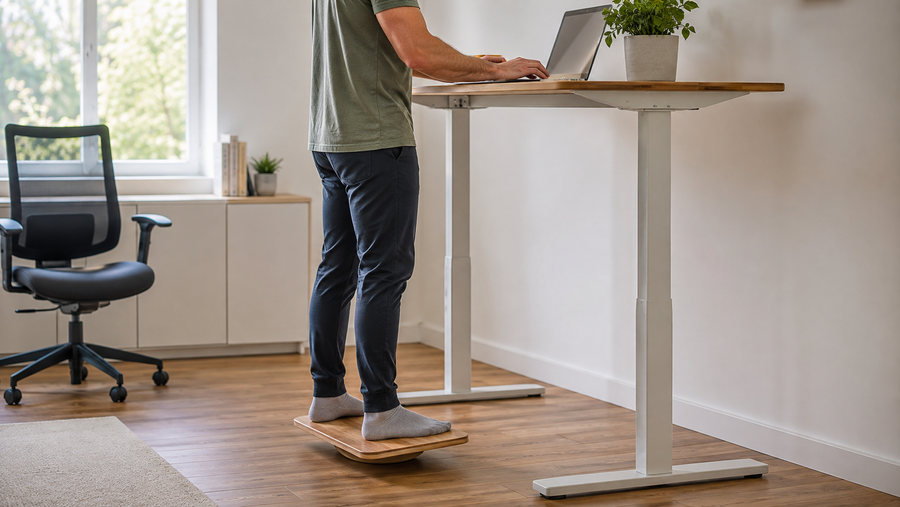
Flat and contoured “active” mats are different products. A contoured mat may offer additional foot positions, but raised features also change stepping and storage. Treat a balance board as a separate active device with a different stability task, not as a more advanced version of a flat anti-fatigue mat.
Place the mat without creating a new hazard
Before placing the mat, lower and unplug the desk only if you need to work near powered parts or under the frame. Do not place the mat under a desk foot, leveling pad, lifting column, or wheel; the desk should keep the floor contact required by its manual.
- Put the mat entirely inside the intended standing zone, with no corner entering a doorway, common walkway, or cable route.
- Press each edge and corner flat. If the mat shifts, curls, or rocks on the floor, remove it rather than adding an improvised fastener.
- Step on and off from the directions you actually use. The edge should remain visible and predictable, not hidden under the desktop or chair.
- Raise the desk to the new standing position and recheck keyboard, mouse, and monitor relationships. Save a new preset only after the setup works.
- Move the chair through its seated path without rolling onto the mat. Establish a simple storage location that does not block the desk, an outlet, a vent, or a walkway.
For a compact workstation, the storage test can decide the purchase. If lifting and moving the mat makes every sit-stand change inconvenient, a smaller stable mat, different floor solution, or supportive footwear may be more usable. Review the current OdinLake standing desk collection only after measuring the workstation; the desk model does not determine whether a separate floor mat fits the room.
Run a controlled mat trial
Use a comparison that resembles your real work. Do not prolong a session to manufacture a result, and stop when discomfort, numbness, swelling, dizziness, instability, or another concerning symptom appears.
- Record a baseline. On two ordinary work sessions, note floor, footwear, desk height, task, position changes, where discomfort begins, and whether you want to sit or move. Do not convert the record into a pain score with false precision; a short descriptive note is enough.
- Change only the surface. Repeat the same type of task with the mat while keeping footwear, desk setup, and movement opportunity as similar as practical.
- Check both comfort and control. Record not only whether the feet or legs feel different, but also whether balance, stepping, reaching, and weight shifts remain natural.
- Test the transition. Move from standing to sitting and back again. The chair, mat, cords, and walking path should remain clear without an awkward lift, kick, or roll.
- Inspect the product afterward. Look for migration, curling edges, permanent compression, visible damage, or residue on the floor. Follow the care instructions before the next session.
Keep the mat when the repeated comparison shows a useful improvement and the safety and transition checks pass. Return or replace it when the result is unclear, when it merely feels plush but destabilizes the stance, or when the room cannot accommodate it without friction. Skip the purchase when correcting desk height, movement timing, footwear, or clutter resolves the original problem.
Know what a mat should not be asked to do
- A mat does not make prolonged static standing harmless.
- A mat does not treat foot, leg, back, joint, vascular, or balance conditions.
- A mat does not correct a desk or monitor that is set at the wrong height.
- A mat does not replace suitable footwear where footwear is needed.
- An anti-fatigue mat is not automatically a slip-resistant mat, chair mat, electrical insulating mat, or workplace safety mat.
- A household rug or yoga mat is not equivalent unless its manufacturer documents suitability for the intended standing and floor conditions.
If symptoms persist despite shorter standing sessions and a workable setup, or if symptoms are sudden, severe, worsening, or accompanied by swelling, loss of sensation, weakness, balance changes, or skin changes, stop experimenting and seek appropriate professional evaluation.
Frequently Asked Questions
Are anti-fatigue mats worth it for a standing desk?
They can be worth a trial when you stand on a hard floor and ordinary standing tasks remain uncomfortable after desk height, footwear, and position changes are addressed. The value is personal and contextual, not automatic. Keep a mat only if it improves repeated real-work sessions without sliding, instability, chair conflict, or a trip edge.
How thick should a standing desk mat be?
There is no universal best thickness. Evaluate how the complete material behaves under your weight: it should provide some elasticity without bottoming out, feeling unstable, or creating an abrupt edge. A thicker or softer product is not necessarily more effective.
Can you use an anti-fatigue mat on carpet?
Only when the mat manufacturer approves the carpet type and the complete combination remains flat and stable. Test for rocking, edge lift, sliding, and chair interference. If the carpet already provides a resilient surface and standing feels acceptable, another layer may add no useful benefit.
Can I use a yoga mat instead of an anti-fatigue mat?
Do not assume they are interchangeable. A yoga mat may be too thin, too soft, too large, or prone to bunching for a desk transition. Use it only if the manufacturer supports the intended standing use and it passes the same stability, edge, floor, cleaning, and storage checks.
Should I wear shoes on an anti-fatigue mat?
Follow the mat manufacturer’s intended use and use footwear appropriate to the setting. Test footwear and mat as separate variables because either one can change stability and comfort. In a workplace, required safety or dress footwear takes priority over a barefoot preference.
How long should you stand on an anti-fatigue mat?
A mat does not create a safe universal standing duration. Change position before discomfort builds, use sitting and brief movement as available, and let the task and your response guide the next change. Do not extend a standing session simply because the surface is cushioned.