The right ergonomic setup should adapt to your body, support frequent movement, and stay comfortable through a full workday.
A soft office chair can feel inviting as soon as you sit down. A firmer one may feel steadier, especially if you dislike sinking into a cushion. Neither first impression tells you everything about how the seat will feel during a workday.
For long hours, look for cushioning you enjoy and support that remains comfortable under your weight. A seat should let you settle into your work without feeling the hard base beneath you or repeatedly moving away from an uncomfortable spot. Understanding the difference between softness and support is a better starting point than choosing one extreme.
Softness and Support Are Different Qualities
Softness describes how readily the surface gives when you first press or sit on it. Support concerns how the cushioning resists further compression as it carries your weight.
Those qualities can exist together. A seat can feel soft at the surface and still offer greater resistance as you settle into it. A firm-feeling cushion, meanwhile, is not automatically a better match for your body.
The Polyurethane Foam Association distinguishes surface firmness from support factor, which describes how foam behaves under deeper compression. It also explains that foam density and firmness are separate properties: high-density foam can be soft, and lower-density foam can be firm.
That makes “choose the hardest seat” an unreliable buying rule. The more useful question is whether the complete seat cushions you comfortably without letting you feel the rigid structure underneath.
What Too Soft or Too Firm Can Feel Like
Imagine settling into a padded chair to answer emails. The initial softness feels pleasant, but as you sit down fully, you become aware of the hard seat base beneath you. In that situation, a softer surface has not provided enough usable cushioning for you.
Now consider the opposite experience. The seat barely yields, and you keep shifting because the contact beneath your hips feels uncomfortably concentrated. Choosing an even firmer chair is unlikely to address what you dislike about that seat.
The aim is to find a seat you can settle onto comfortably while still changing position easily. You should not have to brace yourself against the armrests to get away from an uncomfortable spot.
Check fit before blaming firmness, though. A front edge pressing behind your knees may indicate excessive seat depth rather than excessively hard padding. Make that distinction before replacing a seat whose feel you otherwise enjoy.
Why the First Few Minutes Can Be Misleading
Trying a chair briefly often means sitting down, leaning back, and noticing the cushion. Working in it involves more: typing with your arms near the desk, turning toward a second screen, and settling back to read.
During an ordinary work session, notice whether the seat stays comfortable as those tasks change. You might like a soft cushion when leaning back, then find yourself struggling to sit comfortably near the keyboard. Before choosing firmer padding, check whether you can move close enough to the desk and keep your back supported.
Also distinguish changing position because you want to from moving to escape discomfort. Leaning back to read is a normal change of task. Repeatedly lifting yourself off one sore spot is a reason to reassess the seat or its settings.
A useful seat preference is specific: “I like padding, but I don't want to feel buried in it,” or “I prefer a firmer surface, provided the edge doesn't dig in.” That tells you more about what to look for than a simple soft-or-hard label.
Where the L3 CozyCloud Fits
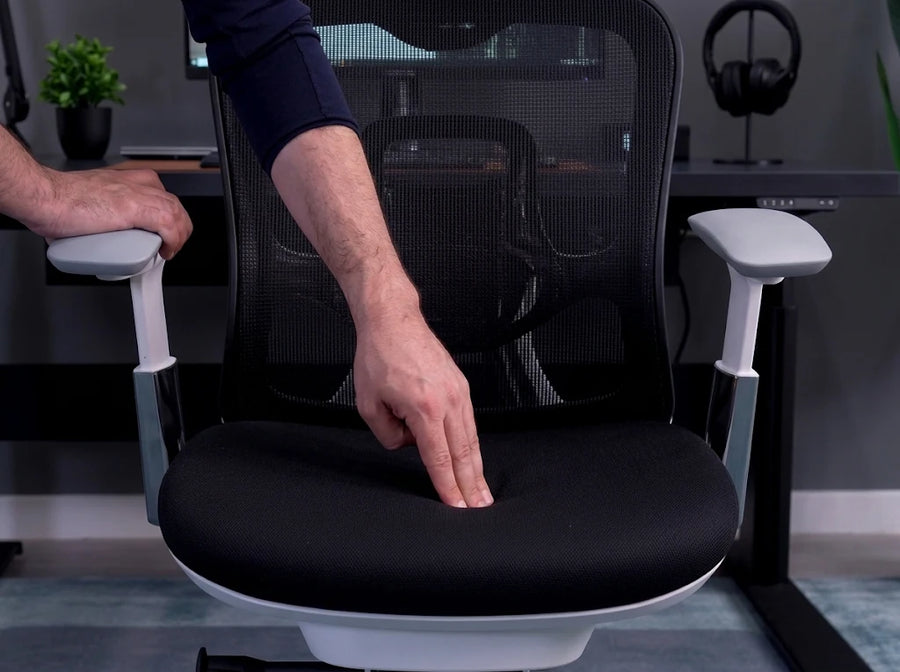
The OdinLake L3 CozyCloud pairs a high-resilience foam core with soft-touch, yoga-inspired fabric. It is the L3 seat option for people who want noticeable padding beneath their hips and thighs.
That makes it worth considering if your current seat feels too taut or you simply prefer an upholstered surface. You do not need to choose a hard seat just because you spend much of the day at a desk.
The fabric and foam contribute different parts of that feel. The fabric provides the contact surface; the foam beneath it provides the compressible padding. A smooth cover alone does not tell you how supportive the cushion will feel once you sit down fully.
High-resilience foam refers to its springy response, rather than a promise that the seat will feel hard. With CozyCloud, the intention is a plush contact surface with responsive cushioning beneath it. That combination is relevant if you want padding but dislike feeling swallowed by a seat.
Assess that feel with the chair adjusted for you. The useful question is whether you enjoy sitting on the cushion while doing your normal work, not whether it feels softer than another chair when pressed by hand.
For long workdays, choose a seat whose feel you like and whose fit lets you work comfortably. There is no benefit in buying the firmest option if you spend the day wishing it had more cushioning.
FAQ
Can I compare seat firmness from product photos?
Photos can show the seat’s shape and upholstery, but they cannot reliably communicate how much it yields under your weight. Look for clear material descriptions, and treat words such as “plush” or “firm” as broad descriptions rather than standardized ratings across brands.
Will a chair feel the same to everyone who uses it?
Not necessarily. People load a cushion differently and have different preferences for how far they settle into it. If two people share a desk, each should assess the seat with the chair adjusted for them. One person’s comfortable firmness may feel too hard or too soft to the other.