The right ergonomic setup should adapt to your body, support frequent movement, and stay comfortable through a full workday.
An office chair works as several connected systems, not as one mechanism. A lever, paddle, knob, button, or body movement provides an input. That input acts on a specific subsystem—such as seat height, recline, seat depth, an armrest, the swivel column, or the casters—and produces an observable movement. The most reliable way to understand a chair is to follow that path from the control you touch to the part that moves.
This system view also prevents a common mistake: identifying a control only by its shape or location. Two chairs can place similar-looking paddles under the seat while assigning them different functions. Even within one brand, control layouts and adjustment ranges can change by model. Use the map below to understand the relationship, then confirm the exact control in the current manual for your chair.
Think of the chair as a chain of inputs and outputs

Start with the movement you want, not the name of a hidden part. The input may be a hand control, a release button, pressure from your body, or a rolling force at the floor. The output should be visible or easy to feel without taking the chair apart.
| Input you provide | Subsystem it may operate | Observable output | What to verify |
|---|---|---|---|
| Pull or lift a height control | Height-release linkage and gas lift | The seat rises or lowers | Whether the model expects weight on or off the seat for the intended direction |
| Turn a tension control | Recline-resistance mechanism | Leaning back requires more or less force | Direction, adjustment range, and whether the chair uses manual or automatic resistance |
| Move a tilt-lock control | Recline-position lock | The backrest can move or hold at a permitted position | Whether the lock engages only at specific positions and whether the backrest must be unloaded first |
| Operate a seat-depth control | Seat-pan slide | The seat moves forward or backward relative to the backrest | The release method and the model’s stop positions |
| Press or lift an armrest, headrest, or backrest control | That component’s guide, detent, or lock | The component changes height, angle, width, or depth | Which directions are actually supported by the model |
| Turn the seated chair | Swivel connection at the center column | The seat and upper chair rotate over the base | Whether rotation is smooth and free of new grinding or instability |
| Push against the floor | Casters and five-star base | The chair rolls and each caster aligns with the direction of travel | Floor compatibility, debris, wheel condition, and secure caster fit |
A control photo can help locate a model-specific input, but it does not prove the function of a similar control on another chair. The two paddles shown in the selected OdinLake O2 image are an O2 example; their icons, direction of operation, and resulting movement should be checked against the O2 guide.
Follow the height signal from the lever to the seat
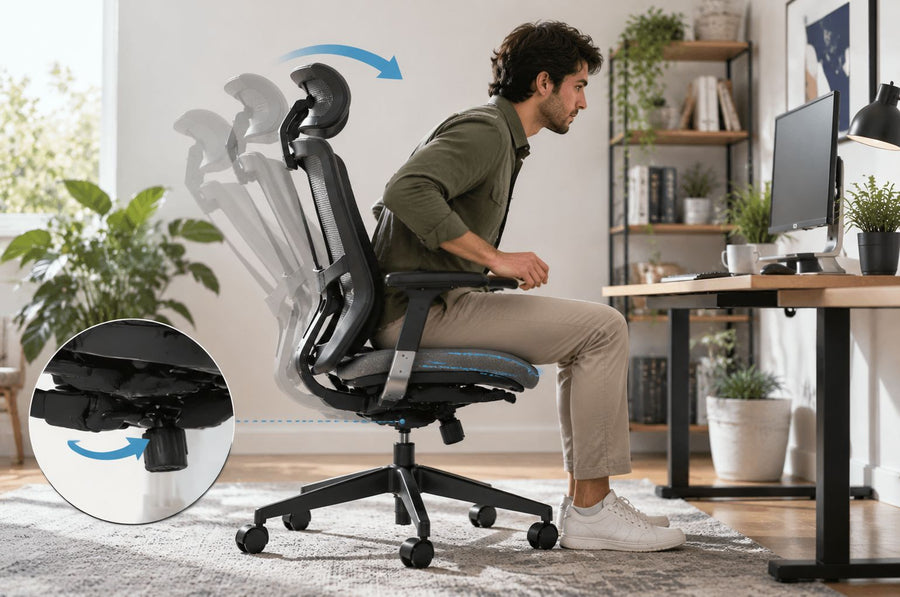
On many height-adjustable office chairs, a lever or paddle operates a release linkage in the under-seat mechanism. That linkage activates the chair’s sealed gas lift. With the release held, taking weight off the seat commonly allows it to rise; applying controlled seated weight commonly allows it to lower. Releasing the control lets the seat hold the selected height. The control direction and the amount of unloading needed are model-specific.
The center column does more than change height. It also connects the upper chair to the base and usually sits on the chair’s swivel axis. That is why a height problem, a swivel problem, and a stability problem can feel as if they come from the same area even when they involve different components.
The gas lift is a sealed, pressurized part, not a user-serviceable container. A slow height change may point to the height subsystem, but it does not identify the failed part by itself. Stop using the chair if it drops abruptly, changes height unpredictably, develops a new sideways lean, or shows visible damage around the cylinder, base hub, or load-bearing structure. For the pressure-system boundary, see OdinLake’s office-chair gas-lift safety guide.
Recline uses separate controls for resistance and position
A chair can lean back because its under-seat mechanism allows the seat, backrest, or both to rotate through a designed range. What happens next depends on the mechanism. Some chairs keep the seat relatively level while the back moves; others coordinate seat and back movement. A description such as “synchronized tilt” is therefore a model feature that must be verified, not a generic name for every reclining chair.
Tilt tension changes the force required to recline
A manual tilt-tension control changes how strongly the mechanism resists backward movement. Turning it should change the effort needed to recline; it should not be assumed to lock the backrest. Some designs use weight-responsive or automatically regulated resistance instead of a large manual knob, so the absence of a familiar round control does not mean the chair has no recline resistance.
Tilt lock changes whether the backrest can move or hold
A tilt-lock or recline-lock control allows movement or holds the chair at one or more permitted positions. It does not necessarily freeze the chair at every angle. A lock may also require the user to reduce pressure on the backrest before it can release. If a control does not move normally, do not force it; confirm the model’s permitted positions and release sequence.
These two functions answer different questions: tension asks, “How much force does reclining take?” Lock asks, “Can the mechanism move, and where may it hold?” Treating them as interchangeable is a common reason a working chair seems unresponsive.
Support surfaces may be fixed, adjustable, or responsive
The parts that contact the body are not all controlled in the same way. A seat, backrest, lumbar element, armrest, or headrest may be fixed to the frame, manually adjustable, spring-loaded, flexible, or designed to follow a limited movement. Understanding which type you have matters before deciding that movement is a fault.
Seat, backrest, and lumbar components
A seat-depth slider changes the seat pan’s position relative to the backrest. A back-height control moves the backrest or a support section vertically. A lumbar element may use a knob, a sliding track, a flexible support, or no separate user control. The visible result—not the control’s appearance—is the useful clue. If the seat moves when you expected lumbar adjustment, stop and recheck the manual rather than continuing to experiment.
Armrests and headrests
Armrests can support one direction of adjustment or several. Their tops may lift, slide, pivot, move inward or outward, or remain fixed. Headrests likewise vary in height, angle, travel path, and release method. A click between designed positions can be normal; uncontrolled slipping, a missing stop, or movement at a structural mount is not the same behavior. Do not use an armrest or headrest as a lever to force a stuck adjustment.
Swivel and rolling happen below the seat
Swivel and rolling are related but distinct. Swivel lets the upper chair rotate around the center column while the base stays oriented to the floor. Rolling happens at the casters. Each caster must both roll at its wheel and rotate at its mounting axis so it can follow a change in direction.
The five-star base connects those casters around the center column. It does not make every caster suitable for every floor. Wheel material, diameter, debris, floor texture, chair load, and the fit of the caster stem can all change how the chair rolls. If the chair turns normally but resists translation, check the caster and floor zone before blaming the height or tilt mechanism. For a non-destructive cleaning sequence, use the office-chair wheel cleaning guide.
Use behavior to locate the subsystem
A behavior map does not diagnose an internal failure, but it can help you choose the correct manual section, photo, replacement-part question, or support route.
| What you observe | Start with this zone | Safe next check | Stop condition |
|---|---|---|---|
| The height control moves, but the seat does not change height | Height control, linkage, and gas-lift system | Confirm the correct control and the manual’s occupied/unoccupied method; try one normal operation without extra force | Stop for sudden dropping, jerky movement, visible damage, or instability |
| The seat slowly sinks after being set | Height-holding system | Record the model and behavior, then request model-compatible service guidance | Stop using it if the change becomes abrupt or the chair leans |
| The chair reclines, but it feels too easy or too difficult | Tilt-resistance system | Identify whether the model has manual or automatic tension before changing a control | Stop if there is grinding, a sudden release, a failed stop, or visible structural damage |
| The backrest will not hold at the expected position | Tilt-lock system | Check the model’s permitted lock positions and whether the backrest must be unloaded to engage or release | Do not force a lever or keep using a lock that releases unexpectedly |
| The chair swivels, but it will not roll smoothly | Casters, base, and floor interface | Inspect each wheel for debris, damage, and secure fit on the actual floor | Stop if a caster socket, base leg, or center hub is cracked or bent |
| One arm, headrest, or support section slips | The affected component’s guide or lock | Compare the observed travel with the exact model guide | Stop if a mount is cracked, hardware is missing, or the component can separate |
| The whole chair has a new wobble or sideways lean | Multiple load-bearing connections | Keep the chair empty and photograph the full chair, seat mechanism, column, base hub, and casters for support | Do not sit down to reproduce the problem |
Identify your chair before testing a control
OdinLake’s assembly videos and product guides provide separate documentation for models such as L1, L2, O1, O2, and O3. That separation is important: the number of controls, supported movements, icons, and release methods are not universal.
- Find the model identifier. Check the product record, order information, manual cover, or model label. Do not choose a manual only because its chair photo looks similar.
- Match the control in the manual. Use its icon, location, direction of movement, and named function together.
- Clear the chair’s movement path. Move it away from the desk, wall, cables, and nearby objects. Keep fingers away from gaps between moving parts.
- Operate one control once. Use ordinary hand force and watch one expected output. If a control requires a different seated or unseated state, follow the manual.
- Return to a stable position. Release the control, confirm that the intended part holds normally, and stop if the result differs from the guide.
The Canadian Centre for Occupational Health and Safety notes that chair controls should be easy to operate from a seated position. If a control is unreachable, hidden by another component, or requires awkward force, do not treat that as an invitation to twist farther or improvise a tool. Recheck the model instructions or ask support to identify it.
What this system map cannot tell you
Observable behavior can narrow a question, but it cannot reveal the condition of a sealed cylinder, prove that a noise is harmless, establish replacement-part compatibility, or show whether a hidden lock is broken. A generic system map also cannot supply a model’s load rating, adjustment range, assembly sequence, fastener specification, or warranty boundary.
Those facts belong to the exact current product record or manual. Do not open an under-seat mechanism, remove covers, tighten unknown hardware, spray a lubricant, or substitute a part merely because the likely subsystem seems clear. Explanation is useful for routing; repair requires a verified procedure.
Choose the next document or support path
If the chair behaves normally, use its manual to connect each control to its supported movement and make one adjustment at a time. If the behavior differs from the manual, record the model, the control used, the starting position, the movement observed, and any sound or visible damage. Clear photos of the complete chair and the affected zone give support a better starting point than a guess about the failed part.
Keep the chair out of service when there is a sudden drop, uncontrolled release, new severe wobble, sideways lean, crack, bent load-bearing part, missing structural hardware, damaged cylinder, or a component that may separate. Those are inspection or service questions, not opportunities for additional trial-and-error.
Frequently Asked Questions
How does an office chair go up and down?
On many adjustable chairs, a height lever activates a release linkage connected to a sealed gas lift. With the release held, removing weight commonly lets the seat rise and controlled seated weight lets it lower. The exact lever direction and operating state should be confirmed in the model manual.
What does the mechanism under an office chair do?
The under-seat mechanism connects user controls to functions such as height release, recline, tension, lock, or seat-depth movement. Not every mechanism includes every function, and similar-looking controls can have different assignments. Identify the model before operating an unfamiliar lever or knob.
What is the difference between tilt tension and tilt lock?
Tilt tension changes the resistance you feel while leaning back. Tilt lock controls whether the chair may recline or hold at one or more designed positions. One changes effort; the other changes permitted movement or position.
Why does an office chair swivel?
A swivel connection around the center column lets the seat and upper chair rotate while the base remains on the floor. This rotation is separate from caster movement. New grinding, binding, leaning, or instability during rotation should be assessed rather than forced.
What are the main parts of an office chair?
Common visible groups include the seat, backrest, armrests, optional headrest or lumbar component, under-seat mechanism, center column or gas lift, five-star base, and casters. The exact parts and adjustment features vary by model, so this list describes system groups rather than a universal parts diagram.
Are all office-chair controls the same?
No. Control shape, location, icon, direction, and function vary across chair mechanisms and models. Use the chair’s model identifier and current manual instead of matching a control to a generic online photo.