The right ergonomic setup should adapt to your body, support frequent movement, and stay comfortable through a full workday.
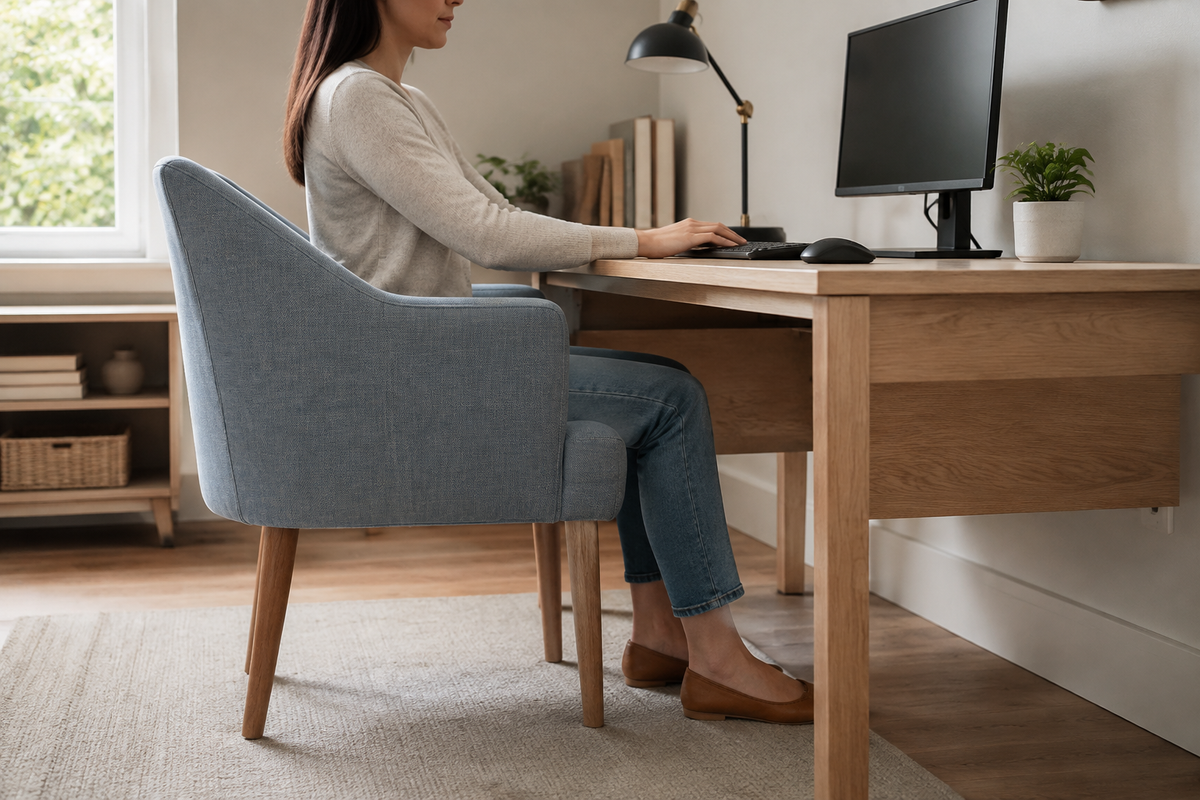
You can use an accent chair as a desk chair when its fixed dimensions happen to fit you, the desk, and the work you do. It is most likely to work for reading, video calls, planning, or occasional laptop use. For sustained keyboard-and-mouse work, a conventional accent chair often leaves too little room to correct a low seat, deep cushion, fixed arms, or reclined back.
The useful question is not whether the chair looks appropriate in a home office. It is whether you can sit against its back, bring the input devices to you, keep your feet supported, and approach and leave the desk without the furniture colliding. You can check those conditions at home before deciding that the chair is suitable.
First, confirm what kind of chair you are evaluating
“Accent chair” describes a broad furniture role, not one technical seating specification. The label may refer to an upright wooden side chair, a padded armchair, a low slipper chair, a curved barrel chair, or a swivel chair. Those forms do not create the same desk setup.
For this guide, a conventional accent chair has a fixed seat height and a base designed mainly for stationary use. An upholstered chair marketed for the office may look like an accent chair while still having height adjustment, a swivel base, casters, or other task-chair features. Evaluate the documented features and dimensions of the exact chair instead of relying on the style name.
This distinction matters because adjustability creates fit options. The Canadian Centre for Occupational Health and Safety (CCOHS) explains that a chair is ergonomic only in relation to a person, workstation, and task; a label alone does not guarantee fit. Its ergonomic-chair guidance also identifies seat height, seat depth, back support, armrest clearance, and stability as connected selection factors.
Measure the chair-to-desk interface
Use a tape measure, the chair, the desk, and the keyboard or laptop you actually plan to use. Measure the chair on the floor where it will work, not on a different rug or surface. A thick cushion compresses under body weight, so a catalog seat height is only a starting point; the seated trial remains decisive.
These four checks expose most of the mismatch before you commit to regular use:
| Fit point | How to check it | A workable result | Common failure |
|---|---|---|---|
| Seated elbow to keyboard | Sit against the back with shoulders relaxed. Let the upper arms hang naturally and place your hands on the keys. | The keyboard meets the hands without raised shoulders, reaching forward, or sharply bending the wrists. | The fixed seat is too low for the desk, so the shoulders rise to reach the keyboard. |
| Usable seat depth | Sit fully back and check the space between the front edge of the cushion and the backs of the lower legs. | The backrest supports you while the front edge does not press behind the knees. | The seat is so deep that you either lose back contact or sit with the edge pressing into the legs. |
| Arm and frame clearance | Measure from the floor to the highest fixed arm or side rail, then compare it with the lowest obstruction under the desk. | The chair approaches close enough for input work without arms, thighs, or knees contacting the desk. | Fixed arms stop at the desk edge, leaving the keyboard beyond a comfortable reach. |
| Foot and floor support | Sit in the intended position and check both feet, the chair legs, and the floor surface. | Both feet are supported, and all chair legs remain stable without rocking or sliding. | Feet dangle, the chair rocks, or a deep pile rug makes the narrow legs unstable. |
Record clearance dimensions in inches and millimeters so you can compare like with like. For the approach check, subtract the highest fixed part of the chair from the lowest obstruction under the desk. For example, a 25.5-inch (648 mm) desk opening minus a 24.75-inch (629 mm) chair arm leaves a nominal 0.75-inch (19 mm) margin. A positive number is not an automatic pass: upholstery compression, movement, clothing, and the path used to sit or stand can consume that space, so confirm the margin in the seated trial.
If you need a repeatable way to record seat, arm, and overall dimensions, use OdinLake’s office-chair measurement guide. That page owns the full measurement method; here, the measurements are used only to answer whether this particular accent chair and desk can meet.
Try the real task, not a showroom sit
A soft chair may feel pleasant during a brief conversation and still make computer input awkward. Put the workstation into its normal working state, including the actual keyboard, mouse, monitor, and any drawer or apron below the top. Then perform the task you expect the chair to support.
- Sit against the backrest. The expected result is steady back contact without having to perch on the front half of the cushion. If the chair is too deep, note the gap rather than immediately hiding it with loose pillows.
- Place both feet on the floor. They should feel supported without the front edge of the seat pressing into the lower legs. If the seat is too high but the upper-body fit works, a stable footrest may be worth testing.
- Bring the chair toward the desk. Stop if a fixed arm, the chair frame, your knees, or your thighs contacts the desk. Do not force upholstered arms under the top or trap your legs below a drawer.
- Use the keyboard and mouse continuously. Type, select text, and move between the keyboard and pointer. Watch for shoulders lifting, elbows reaching forward, wrists bending to meet the work surface, or the torso leaving the backrest.
- Reach for one routine item and leave the chair. You should be able to turn or stand without twisting around a fixed arm, catching a cable, or dragging an unstable chair across the floor.
The Occupational Safety and Health Administration advises placing the keyboard directly in front of the user, with relaxed shoulders, elbows close to the body, and wrists in line with the forearms. OSHA’s keyboard guidance also treats chair height and work-surface height as a coordinated system. A fixed-height accent chair removes one of the main adjustments available in that system.
Run the trial long enough to complete a normal work sample, not to prove that you can tolerate the chair for an arbitrary number of hours. A pass means the arrangement remains usable while you type, point, look at the screen, shift position, and stand. Repeated compensation is a failure signal even if the chair initially feels soft.
Some reversible changes can rescue a near fit
Change the workstation only after identifying the failed relationship. One accessory cannot correct every mismatch.
- If the seat is a little too deep: a firm back-support cushion may reduce the usable depth if it stays in place and does not push you onto an unstable edge. Treat this as a trial, then repeat the back-contact, seat-edge, and stability checks.
- If the feet need support: use a stable footrest only when the chair-to-keyboard height already works. A footrest supports the feet; it does not raise a low chair toward a high desk.
- If a laptop creates the conflict: an external keyboard and mouse let the screen and input height be handled separately. Raising the laptop alone while continuing to type on it simply moves the reach problem.
- If the desk is slightly too high: an appropriate adjustable keyboard tray may lower the input surface, provided it has enough leg clearance and is installed according to the desk and tray instructions.
- If fixed arms block approach: move to an armless chair or a chair with arms designed to clear the desk. Do not remove structural parts unless the manufacturer explicitly permits it.
Avoid stacks of loose cushions, blocks under chair legs, improvised casters, shortened legs, or drilled frame changes. Those modifications can make a stationary chair unstable or exceed its intended construction. Do not keep testing a chair with loose joints, cracks, a damaged frame, or an unknown load limit.
Match the chair to the amount of input work
An accent chair is easier to justify when the work does not require continuous, precise contact with a fixed desk. Reading a report, joining a short call, reviewing a tablet, or using a notebook may allow more position changes and less exact keyboard alignment. That makes a well-fitting accent chair a reasonable secondary seat in some rooms.
Writing, editing, spreadsheet work, design, gaming, and other sustained mouse-and-keyboard tasks are less forgiving. The chair must repeatedly meet the same input surface while supporting changes in position. A fixed seat may fit one person and one desk on one day, but it provides little correction when another user, footwear, cushion compression, or task changes the geometry.
That does not mean every office chair fits automatically. CCOHS notes that one chair does not fit everyone and recommends evaluating the person and job in the real work setting. The practical advantage of a task chair is the ability to adjust several connected dimensions instead of depending on a lucky fixed match.
Keep the accent chair for occasional seating when the fit fails
Do not use the accent chair as the primary desk seat when any of these conditions remains after a simple, reversible setup change:
- you cannot sit against the back and reach the keyboard at the same time;
- the chair is too low for the input surface and the desk or keyboard height cannot be adjusted;
- fixed arms or the frame prevent a close approach;
- the seat edge presses behind the knees when the back is supported;
- the chair rocks, slides, or has visible structural damage;
- you cannot change position or stand without wrestling with the chair and desk;
- the setup repeatedly produces numbness, tingling, increasing pain, or another concerning symptom.
Persistent, severe, sudden, or worsening symptoms deserve evaluation by a qualified health professional. Changing furniture is not a diagnosis or treatment.
Choose the next chair from the failed relationship
If the accent chair fails, record why before shopping. A low fixed seat points to seat-height range. Excess depth points to seat-depth fit or adjustment. Desk collision points to armrest height, width, or removability. Difficulty approaching the work points to the base, overall width, and desk clearance. This short failure note is more useful than searching for a chair described only as stylish or comfortable.
CCOHS recommends trying suitable chairs in the real work situation before final selection. When you compare adjustable ergonomic desk chairs, check the current dimensions and controls of the exact model against the failure you recorded. The goal is not to make the workstation look more technical. It is to gain the adjustment that the accent chair could not provide.
Frequently Asked Questions
Can an accent chair be used at a desk?
Yes, if the chair lets you sit against its back, support your feet, approach the desk, and use the keyboard and mouse without repeated reaching or shoulder lifting. Because most conventional accent chairs have fixed dimensions, the fit must be checked with the actual person, desk, and task.
Is a dining chair better than an accent chair for desk work?
Not automatically. A dining chair may be more upright and easier to pull under a desk, while an accent chair may offer more padding or back contact. Compare seat height, usable depth, desk clearance, stability, and the real input task rather than choosing by furniture category.
Are swivel accent chairs good for a home office?
A swivel can make it easier to turn and leave the workstation, but it does not solve a low seat, deep cushion, fixed arm collision, poor back contact, or unstable base. Some accent-style swivel chairs also include office adjustments; verify the exact model instead of assuming the word “swivel” makes it a task chair.
What seat height should an accent chair have for a desk?
There is no single seat height that works for every person and desk. The working relationship matters: your feet need support, the front edge should not press behind the knees, and the keyboard should meet relaxed arms without forcing the shoulders upward. Measure and test those conditions rather than relying on a category average.
Can I add a cushion to make an accent chair higher?
A firm, non-slip cushion may change seated height, but it can also reduce stability, raise the body into fixed arms, or change usable seat depth. Do not stack loose cushions or treat them as a permanent structural modification. Re-test the whole chair-to-desk fit and stop if the cushion slides or leaves too little stable seat area.
What makes a chair suitable for regular computer work?
The chair must fit the user, workstation, and task together. Useful features include an appropriate seat-height range, suitable seat depth, stable back support, armrests that do not block desk access, a stable base, and controls the user can operate. Adjustability provides options, but the final check is still a real work trial.