Quick Answer: The best office chair for back support has adjustable lumbar support, a supportive backrest, proper seat depth, and stable recline. For long workdays, an ergonomic chair is usually better than a basic padded chair because it...
The right ergonomic setup should adapt to your body, support frequent movement, and stay comfortable through a full workday.
Quick Answer:
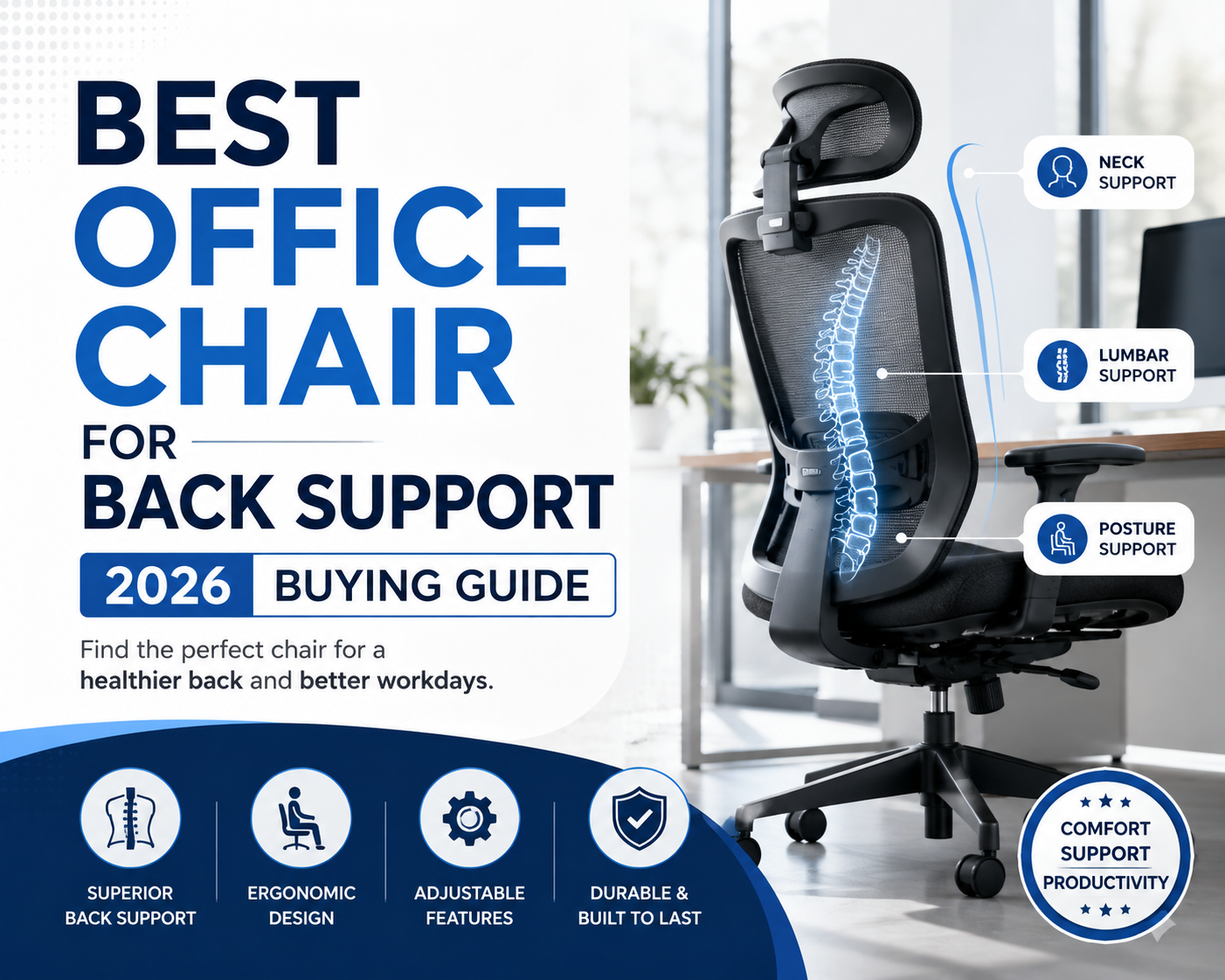
The best office chair for back support has adjustable lumbar support, a supportive backrest, proper seat depth, and stable recline. For long workdays, an ergonomic chair is usually better than a basic padded chair because it supports posture, not just softness.
A good chair should keep your lower back in contact with the backrest. It should also let your shoulders relax, your feet rest flat, and your sitting position change during the day.
Back support office chairs mainly help relieve lower back discomfort caused by prolonged sitting by promoting proper posture. If you are already experiencing back pain or other discomfort, you should seek medical attention promptly, as a chair alone cannot fundamentally solve the problem.
What Makes an Office Chair Good for Back Support
A back support chair should support posture, not only comfort. The right chair helps your lower back, hips, shoulders, and arms stay aligned during desk work.
Adjustable Lumbar Support
Adjustable lumbar support is the core feature of a good back support chair. The lumbar area sits in the lower back, where many office workers feel pressure during long sitting sessions.
The support should fit into the small of your back without pushing your body forward. Height adjustment matters because torso length varies from person to person. A fixed lumbar curve may fit one user and miss another.
For long hours, choose lumbar support that adapts to small posture changes. Your lower back still needs support when you type, lean back, or shift in the seat.
Supportive Backrest Shape
A supportive backrest follows the natural curve of your back. It should not leave a large gap between your spine and the chair.
A flat backrest may look simple, but it often gives weak support during long work. A shaped backrest helps your lower back stay supported while your upper body remains open and stable.
A taller backrest can also help users who need upper back and shoulder support. This matters during meetings, reading, planning, or focused work when the body tends to lean toward the screen.
Seat Height and Depth Fit
Seat height affects back support because it changes your hip and knee position. Your feet should rest flat on the floor or on a footrest, while your thighs stay roughly parallel to the floor.
Seat depth also affects lower back contact. If the seat is too deep, you may slide forward and lose lumbar support. If the seat is too shallow, your thighs may not get enough support.
A good chair lets you sit fully back while keeping a small gap between the seat edge and the back of your knees. This position helps your back use the chair instead of holding posture alone.
Recline and Tilt Control
Recline helps when it feels stable and controlled. A chair should not force your body into one stiff upright position all day.
A stable recline changes pressure on your back during long work sessions. Tilt tension also matters because the chair should respond to your body weight without feeling loose.
For back support, choose a chair that reclines smoothly and can hold a secure position. This helps you shift between typing, reading, calls, and short breaks.
Armrest and Shoulder Alignment
Armrests affect your shoulders, neck, and upper back. They should support your arms without lifting your shoulders.
If armrests are too high, your shoulders may rise. If they are too low, your upper body may lean forward or collapse toward the desk.
Adjustable armrests help match different desk heights and work styles. They keep your elbows close to your body while typing, using a mouse, or joining video calls.
How to Choose the Best Office Chair for Your Back
The right chair depends on body size, sitting time, desk setup, and support needs. Do not choose by softness alone.
Match the Chair to Your Body Size
Body fit should come before style. A chair that does not match your height, weight, or leg length can create pressure even if it has ergonomic features.
Check seat height, seat width, seat depth, backrest height, and weight capacity. Shorter users may need a lower seat range and adjustable seat depth. Taller users may need a higher backrest and deeper thigh support.
Larger users should also check frame strength and weight capacity. A stable chair should support daily movement without wobbling or losing alignment.
Check Where Lumbar Support Sits
Lumbar support should meet your lower back, not your mid back or hips. When you sit fully back, the support should fill the natural curve above your pelvis.
A well-designed chair can still feel wrong if the settings do not match your body. OdinLake explains the main setup steps in its guide on how to adjust an ergonomic chair correctly, including seat height, lumbar support, armrests, and recline.
Adjust the chair before judging comfort. Small changes in seat height, backrest angle, and armrest position can change how your back feels during work.
Choose Adjustability Over Soft Padding
Soft padding can feel comfortable at first, but it does not always support your back. A chair that is too soft may let your hips sink, and your posture collapse.
Adjustability usually matters more than thick cushioning. Seat height, seat depth, lumbar support, recline tension, armrests, and headrest position all affect how your body sits.
A supportive chair should keep its shape through long workdays. Firm support, breathable materials, and a stable frame matter more than padding alone. If you are comparing sitting feel and airflow, OdinLake’s article on cushion chair vs mesh office chair helps explain why mesh often works better for long hours.
Consider Long Hours of Sitting
Long workdays require support and movement. Even a good chair should let you shift posture, recline briefly, and reset your position.
If you sit six to eight hours a day, look for lumbar support, breathable materials, stable recline, and adjustable armrests. If you sit longer, prioritize stronger adjustability and a backrest that supports more than one posture.
OdinLake also explains how to compare chair support, recline, airflow, and body fit in its article on choosing the best ergonomic office chair for long hours. Use that comparison when your main concern is daily sitting time, not only one support feature.
A chair cannot replace breaks, stretching, or movement. It can reduce strain from a poor sitting setup when it fits your body and desk.
Review Materials and Breathability
Materials affect comfort during long sitting sessions. Mesh is popular because it allows airflow and reduces heat buildup.
Breathability matters in home offices, warm rooms, and long workdays. When a chair traps heat, users often shift forward or sit away from the backrest, which weakens back support.
Choose materials that hold shape, allow airflow, and feel stable. The seat should support your thighs without sharp pressure points.

Recommended for everyday back support
If you're looking for a chair that balances ergonomic support with everyday comfort, the OdinLake L3 FlexBreath is worth considering. Its adaptive lumbar support responds to your movements, while the breathable mesh back, adjustable seat depth, and synchronized recline help maintain a healthier sitting posture throughout the workday. It's an excellent option for professionals and remote workers who spend six to eight hours at their desk and want premium ergonomic features without paying flagship-level prices.
Best Office Chair Types for Back Support
The best chair type depends on how you sit, how long you work, and where your back needs support. Choose by fit first, then by features.
Ergonomic Mesh Office Chairs
Ergonomic mesh office chairs work well for users who need airflow and structured support. They fit long workdays because the backrest can stay breathable while still supporting posture.
The OdinLake O2 Ergo MAX 747 fits users who want targeted back support for long sitting. It uses a three-section independent backrest to support the cervical, thoracic, and lumbar regions. It also offers dynamic lumbar support with five adjustment levels.
If breathability is part of your decision, compare fit, support, and material quality in OdinLake’s guide to the best mesh office chairs. This helps narrow the choice when you want back support without heat buildup.
High Back Office Chairs
High back office chairs support more than the lower back. They can help users who need upper back, shoulder, and neck support during long desk sessions.
The OdinLake O3 Ergo BUTTERFLY 753 fits users who want a highly adjustable high back chair. It includes dynamic lumbar support, height-adjustable backrest, 3D adjustable armrests, 3D adjustable headrest, seat depth adjustment, and a 90 to 135 degree tilt range.
High back chairs work best for users who switch between typing, calls, reading, and leaning back. They give more full back contact than a low back task chair.

Reclining Office Chairs
Reclining office chairs help users move between work and short rest positions. The recline should feel stable, not loose.
The OdinLake L2 Ergo PRO 633 fits users who want recline and leg support in the same chair. It includes a built-in footrest, multi-angle recline up to 135 degrees, tilt lock, adjustable armrests, a mesh back, ventilated PU leather, and ergonomic lumbar support.
This chair type is useful for users who work long hours and take short recovery breaks at the desk. For typing, the chair should still be adjusted to a supported upright position.
Big and Tall Office Chairs
Big and tall office chairs need a stronger structure and a better fit. Weight capacity affects stability, movement, and daily support.
The OdinLake L1 Ergo UPGRADE 518 supports up to 350 lbs and is built for larger users. It includes dynamic lumbar support, FlexBreath mesh, adjustable backrest height, adjustable headrest, 3D armrests, and recline up to 135 degrees.
This chair type works for users who need a stronger frame without giving up ergonomic movement. Check seat width, seat height range, backrest height, and weight capacity before buying.
Home Office Desk Chairs
A home office desk chair should support several tasks in one space. Remote workers often use the same chair for writing, calls, meetings, reading, and short breaks.
The OdinLake O1 Ergo PLUS 743 fits users who want dynamic lumbar support in a home office chair. Its C-shaped lumbar system responds to sitting movement. It also includes seat depth adjustment, 4D armrests, a height-adjustable backrest, and recline up to 135 degrees.
For home offices, avoid chairs that only look soft. A breathable and adjustable chair usually gives better daily support than a bulky chair that cannot adapt to your posture.
Office Chair Comparison for Back Support
|
Chair Type |
Best For |
Recommended OdinLake Chair |
Key Back Support Feature |
|
Ergonomic Mesh Office Chair |
Long workdays and breathable support |
OdinLake O2 Ergo MAX 747 |
Three-section backrest with five-level dynamic lumbar support |
|
High Back Office Chair |
Upper back, shoulder, and neck support |
OdinLake O3 Ergo BUTTERFLY 753 |
High back design with headrest, backrest, and lumbar adjustment |
|
Reclining Office Chair |
Work, recline, and short desk breaks |
OdinLake L2 Ergo PRO 633 |
135-degree recline with built-in footrest and lumbar support |
|
Big and Tall Office Chair |
Larger users who need stronger support |
OdinLake L1 Ergo UPGRADE 518 |
350 lbs capacity with dynamic lumbar support and stable frame |
|
Home Office Desk Chair |
Remote work and flexible daily use |
OdinLake O1 Ergo PLUS 743 |
C shape dynamic lumbar support with seat depth adjustment |
Common Mistakes When Buying a Back Support Chair
A back support chair should fit your body and work habits. Many poor choices come from focusing on one feature while ignoring the full sitting setup.
Choosing Cushioning Instead of Support
A soft chair is not always a supportive chair. Thick padding may feel good at first, but it can lose shape and let your posture collapse.
Choose a chair that supports your lower back, keeps your hips stable, and lets you sit fully against the backrest. Support should come from structure, adjustment, and fit.
Ignoring Seat Depth and Height
Seat depth and height decide whether your back reaches the backrest. If the chair is too deep or too high, you may slide forward and lose lumbar contact.
Before buying, check whether the seat supports your thighs without pressing behind your knees. Your feet should rest flat on the floor or on a footrest.
Buying Without Lumbar Adjustment
A fixed lumbar curve does not fit everybody. Adjustable lumbar support works better for different torso lengths, shared workspaces, and home offices.
Look for height adjustment, depth control, or dynamic support when possible. These features help place support where your lower back needs it.
Overlooking Workday Sitting Habits
Your best chair depends on how you work. A user who types for hours may need different support from a user who reclines during calls.
Think about your real day before choosing. Consider typing, meetings, reading, gaming, and breaks. The right chair should support your work habits, not just your product photo preference.
Expecting One Chair to Solve Everything
A better office chair can improve sitting support, but it cannot fix every cause of back pain. Desk height, monitor position, keyboard placement, movement, sleep, exercise, and health factors also matter.
Use the chair as one part of a better workstation. Adjust it carefully, move often, and seek professional care if pain is serious or persistent.
FAQ
What is the best office chair for back pain?
The best office chair for back pain is usually an adjustable ergonomic chair with lumbar support, seat depth control, stable recline, and armrests that keep your shoulders relaxed. It should fit your body and support your lower back when you sit fully against the backrest.
A chair can improve sitting comfort, but it should not be treated as medical treatment. Persistent or worsening pain should be checked by a healthcare professional.
What chair is best for sitting long hours?
The best chair for sitting long hours has breathable materials, adjustable lumbar support, a supportive backrest, stable recline, and enough seat adjustment to match your body. Mesh ergonomic chairs are practical because they reduce heat buildup during long sessions.
For OdinLake users, O2 fits long workdays with targeted back support. O1 fits home office users who want dynamic lumbar support in a flexible daily chair.
How to sit for long hours in the office?
Sit fully back in the chair and keep your feet flat on the floor or on a footrest. Adjust the lumbar support so it meets your lower back. Keep your shoulders relaxed, elbows close to your body, and screen at a comfortable height.
Change position during the day. Even with a supportive chair, standing up and moving regularly helps reduce stiffness from staying in one posture.
What is a 24-hour office chair?
A 24-hour office chair is designed for continuous use in places such as control rooms, call centers, dispatch centers, and shift-based workplaces. These chairs usually focus on durability, adjustability, and support for multiple users.
Most home office users do not need a true 24-hour chair. A well-fitted ergonomic office chair is usually enough for daily work.
What is the difference between an ergonomic chair and an office chair?
An office chair is a broad category for desk seating. An ergonomic chair is designed to fit the body better through adjustable support.
Common ergonomic features include lumbar support, adjustable seat height, seat depth control, recline tension, adjustable armrests, and a supportive backrest. These features help the chair fit the person instead of forcing the person to fit the chair.
Are mesh office chairs good for back support?
Mesh office chairs can be good for back support when they have a structured backrest, adjustable lumbar support, and enough stability. Mesh alone does not guarantee support.
Choose a mesh chair that holds its shape and lets you adjust the lumbar area. Breathability is helpful, but support and fit should come first.
Conclusion
The best office chair for back support should fit your body, support your lower back, and keep you comfortable through real workday tasks. Adjustable lumbar support, seat depth, backrest shape, recline control, and armrest alignment matter more than softness alone.
Choose OdinLake O2 for long workdays and targeted back support. Choose O3 for high back support and full body adjustability. Choose L2 if you want recline and a built-in footrest. Choose L1 if you need big and tall support. Choose O1 if you want dynamic lumbar support for a home office.
Start with fit. Then match the chair to your work style. A chair that supports your body, matches your desk, and allows movement will serve your back better than one chosen only by padding, price, or appearance.