The right ergonomic setup should adapt to your body, support frequent movement, and stay comfortable through a full workday.
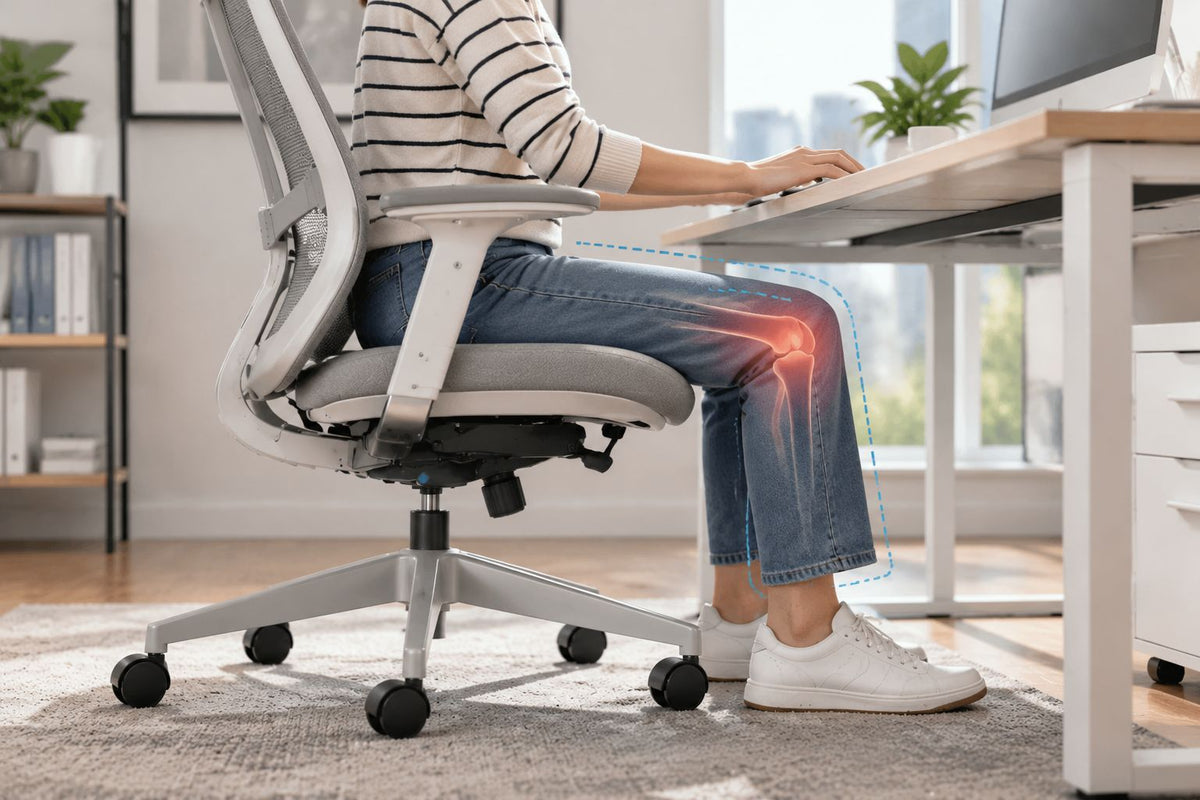
Your office chair may be contributing to knee discomfort if the seat leaves your feet unsupported, presses near the backs of your knees, blocks comfortable leg movement, or makes you twist during ordinary desk tasks. But a chair cannot identify the medical cause of knee pain. The safest way to investigate is to note when the discomfort begins, inspect the chair–floor–desk relationship, and compare one reversible setup change at a time.
A useful chair check should answer a narrow question: does a specific, observable workstation mismatch change the discomfort during an ordinary work cycle? It should not require you to sit until pain becomes intense, force your knees into a prescribed angle, or buy an accessory before you know which relationship is failing.
This guide covers office-chair fit and workstation use. It does not diagnose knee conditions, prescribe treatment, or replace an assessment by a qualified healthcare professional.
When knee pain is not an office-chair experiment
Knee pain can have many causes, including causes unrelated to sitting. Before touching a chair control, decide whether a furniture comparison is appropriate at all.
Use urgent medical services according to local guidance if your knee is very painful, you cannot move it or put weight on it, it is badly swollen or has changed shape, it locks or gives way, or it is hot or red and you also have a high temperature or feel unwell. These are among the warning signs listed in the NHS knee-pain guidance. Pain after an injury, calf discoloration or swelling, numbness, and tingling also deserve appropriate medical attention. Do not use chair adjustments to delay care.
Arrange a non-emergency evaluation when the problem persists, worsens, keeps returning, affects normal activities, or appears in several settings. If a clinician has already given you instructions, those instructions take priority over general workstation advice.
If the symptom is mild, ordinary sitting remains tolerable, and none of those concerns applies, you can make a brief, low-risk fit comparison. Stop if the discomfort meaningfully increases.
Find the first moment the pattern appears
Do not begin with a diagnosis or a generic label such as “bad posture.” Begin with the work cycle. The moment when the symptom first appears tells you which physical relationship to inspect first.
| Moment in the work cycle | What to observe | First workstation check |
|---|---|---|
| Sitting down | The chair rolls away, rotates unexpectedly, feels too low to enter smoothly, or requires a hard drop into the seat | Caster behavior, floor compatibility, base stability, approach path, and documented seat-height range |
| Steady keyboard or reading work | Feet hang or keep searching for support; the seat edge contacts the back of the legs; a drawer or desktop crowds the knees | Foot support, seat height, usable seat depth, front-edge contact, and desk clearance |
| Reaching, turning, or rolling | One foot braces against the floor, one knee turns while the chair does not, or frequently used items sit outside an easy reach zone | Caster movement, swivel, cable or storage obstruction, input placement, and left–right task symmetry |
| Standing up or after leaving the desk | The discomfort is strongest on rising, continues away from the chair, or also appears with stairs, walking, a car seat, or another chair | Stable exit space and chair height, followed by a health evaluation when the pattern is not specific to this workstation |
Also record the side, broad location, and timing in plain language: front of the knee, behind it, inner or outer side, one knee or both, immediate or delayed. Those observations help a clinician or ergonomics professional, but location alone does not identify the underlying structure or condition.
Read the workstation as a chain, not a chair
An office chair does not operate in isolation. Your feet meet the floor or footrest; the seat establishes your working height; the desk determines whether your legs have room; and the keyboard, mouse, phone, and screens influence whether you remain centered or repeatedly twist.
The Canadian Centre for Occupational Health and Safety chair-adjustment guide describes the seat, work surface, and floor as three linked contact areas. Its process adjusts the chair for the user, then checks whether the fixed workstation can accommodate that position. That dependency is important: changing the chair to satisfy a high desk can leave the feet unsupported, while lowering the chair for the feet can make the desk too high for the upper body.
Four links deserve special attention when knee discomfort occurs at a desk:
- Feet to support: Both feet should have stable, usable support. If only the toes reach, the feet swing, or you brace them on the chair base, the seat–floor relationship has failed.
- Seat to lower legs: The seat should support the thighs without its front edge pressing into the area behind the knees. A rounded edge does not make an overlong seat fit.
- Legs to desk: The space below the work surface should allow the knees, thighs, and feet to enter and change position without hitting a drawer, support bar, cable tray, or storage unit.
- Chair movement to task: The chair should roll and swivel predictably enough that turning for a phone, secondary screen, or storage area does not depend on planting one foot and twisting the leg.
OSHA’s computer-workstation chair guidance likewise connects supported feet, seat height, seat depth, and knee clearance. It notes that a seat pan that is too long can place pressure near the knee area and make it harder to use the backrest. OSHA’s work-space guidance separately emphasizes clearance for the legs under the desk. These are ergonomic fit criteria, not proof that a chair caused a knee disorder.
Test the chain from the floor upward
Use the exact chair manual before operating unfamiliar controls. Put the chair on its normal, flat working surface, clear the path under the desk, and photograph the current settings so you can restore them. If the chair drops, tips, wobbles severely, has a cracked base or seat, binds during movement, or behaves unpredictably, stop using it and contact the manufacturer or an authorized service channel.
Then work upward through the chain. Change only one field before repeating the same ordinary task.
- Establish dependable foot support. Sit in the working position with your footwear as normally used. Check whether the whole foot can rest on the floor without reaching, bracing, or sliding forward. If the desk requires a higher chair position, test a stable footrest that supports both feet; do not use a rolling box, stack of books, chair base, or other improvised object that can move.
- Set height without chasing a perfect angle. Use the documented height control to seek broad thigh support, stable feet, and an entry and exit that do not feel forced. There is no single knee angle that fits every person, task, chair, or medical need. OdinLake’s office-chair height guide explains how to coordinate seat height with the work surface and foot support.
- Check usable depth while sitting against the backrest. The relevant question is whether you can use the back support while keeping the seat edge away from the backs of the knees and lower legs. If your model has a seat slider or a forward–backward backrest adjustment, move it only within the manual’s range. Perching forward to escape the edge is evidence of a fit conflict, not a solution.
- Clear the knee and foot zone. Remove movable storage, bins, and loose cables from the leg area. Check drawer rails, crossbars, keyboard trays, and desk supports. Do not simply raise the chair to get above an obstruction if doing so takes away foot support.
- Bring the task to the centered position. Place the keyboard, pointing device, phone, and frequently used items so an ordinary task does not require repeated one-foot bracing, a planted-knee turn, or sitting diagonally. Confirm that casters suit the floor and that cables do not block rolling.
After each change, use the same low-consequence task only long enough to detect an obvious difference. Record the discomfort at the start, during the task, when rising, and after leaving the chair. Return to the saved baseline before testing the next variable. If the comparison requires you to push through pain, it is no longer a useful workstation test.
Translate the result into a next action
A before-and-after comparison can show that a setup variable matters during a task. It cannot diagnose why your knee hurts.
| Observed result | Defensible interpretation | Next owner |
|---|---|---|
| Stable foot support reduces the problem, but the desk then feels too high | The chair and fixed work surface cannot support both lower- and upper-body work in the same position | Workstation adjustment: desk height, keyboard tray, or a stable footrest paired with an appropriate chair height |
| Shorter usable seat depth removes back-of-leg contact while the backrest remains usable | The previous depth or backrest position was a contributing fit variable | Keep the documented setting and monitor the pattern without calling it a treatment |
| Moving a drawer, cable, or input device eliminates one-sided bracing or turning | The desk layout, not just the chair, was shaping the movement | Preserve the clearer task path and recheck normal work |
| No available setting provides foot support, knee clearance, backrest access, and desk reach together | The current chair or workstation has a measurable range mismatch | Ergonomics assessment or replacement comparison based on the failed dimensions |
| Pain occurs in several chairs, during walking or stairs, after an injury, or continues away from the desk | The pattern is not specific enough to treat furniture as the answer | Qualified healthcare professional |
| The chair rolls unpredictably, drops, cracks, binds, or wobbles | This is a product-condition or compatibility issue | Stop use and contact the manufacturer or authorized service provider |
One clear response is more useful than several simultaneous adjustments. If lowering the seat, moving the seat pan, adding a cushion, and moving the keyboard all happen at once, you will not know which change helped or which created a new mismatch.
Capture the failed dimensions before shopping
“Best chair for knee pain” is not a fit specification. If the current setup cannot pass the checks above, record the relationship that fails and compare documented ranges.
- Measure compressed working seat height from the floor at your normal setting, plus the chair’s usable minimum and maximum.
- Measure usable seat depth from the back-support contact plane to the front edge, not simply the largest exterior dimension.
- Record whether the backrest remains reachable at the depth that gives the lower legs clearance.
- Measure the desk underside height and the clear width and depth available to the knees and feet.
- Record any armrest, drawer, frame, or keyboard-tray collision that prevents the chair from approaching the work.
- Note the floor type, caster type, chair movement, normal footwear, footrest height, and any accessory that changes the seat position.
For example, suppose an advertised seat depth is 19 in (48.3 cm), but the backrest projects 1.5 in (3.8 cm) forward in your working position. The relevant usable depth is about 17.5 in (44.5 cm), not 19 in. That number still does not guarantee comfort; it simply gives you a repeatable basis for comparing another setup.
Use the same landmarks for every chair. The OdinLake guide to measuring an office chair separates usable seat measurements, adjustment ranges, desk interface, and working footprint. When comparing the current ergonomic-chair range, verify the exact product page and manual rather than assuming every model has the same controls.
A replacement candidate should correct the failed range while preserving the links that already pass. If possible, test it with your real keyboard, mouse, desk clearance, and entry and exit movement; a short showroom sit cannot reproduce the full work cycle.
Accessories change the chain
A footrest can be appropriate when the chair must be raised for a fixed work surface and the feet would otherwise be unsupported. It should be stable, large enough for both feet, positioned without forcing a narrow stance, and compatible with safe chair movement and exit. If it slides, tips, blocks the casters, or forces the knees against the desk, it has created a different problem.
A seat cushion raises the body and usually changes effective seat depth, backrest contact, armrest height, desk clearance, and control reach. It may change comfort, but it is not evidence that it treats the cause of knee pain. Do not stack cushions, cover damage, bridge a broken seat, or use a pad that can slip. Recheck the whole chain after any addition.
Likewise, a pull-out leg rest is not a substitute for stable foot support during keyboard work unless the chair’s documentation specifically supports that use and the position remains safe. Individual therapeutic seating or mobility needs should be assessed by an appropriate clinician or ergonomics professional.
Frequently Asked Questions
Can an office chair cause knee pain?
An office chair or workstation mismatch can contribute to or aggravate knee-area discomfort through unsupported feet, back-of-leg contact, restricted desk clearance, or repeated twisting and bracing. That does not prove the chair caused a medical knee condition. Compare observable fit variables and seek healthcare guidance when the pattern persists, worsens, follows an injury, or is not specific to the chair.
Should my knees be at 90 degrees in an office chair?
A 90-degree knee angle can be a convenient reference, but it is not a universal target or a position to hold rigidly. Prioritize stable foot support, broad thigh support without pressure behind the knees, usable back support, adequate desk clearance, and the ability to change position. Follow individualized clinical advice when you have a diagnosed condition or accommodation.
Why does the back of my knee hurt in a desk chair?
Check whether the seat’s front edge touches the back of the knee or lower leg, whether the seat is too deep to use with the backrest, and whether unsupported feet concentrate pressure under the thighs. These are workstation clues, not a diagnosis. Stop the fit check and obtain medical advice if pain is severe, follows an injury, or comes with swelling, redness, heat, locking, instability, numbness, or other concerning signs.
Is my office chair too high or too low for my knees?
It may be too high if your feet hang, only your toes reach, or you slide forward to find support. It may be too low for the workstation if your legs feel crowded, standing up is difficult, or the desk then forces the upper body upward. Check seat height together with foot support, seat depth, desk clearance, and input height rather than judging from knee angle alone.
Will a footrest help knee discomfort at a desk?
A stable footrest can restore foot support when a fixed desk requires the chair to remain higher than your feet can comfortably reach. It will not correct an overlong seat, inadequate desk clearance, a damaged chair, or a medical cause of knee pain. After adding one, recheck knee space, backrest access, chair movement, and safe entry and exit.
Why do my knees hurt when I stand up from my desk chair?
Record whether the chair rolls, rotates, or feels unusually low during the transfer, and whether the same discomfort occurs when rising from other seats. Do not use that timing to diagnose the cause. Pain that is severe, recurrent, associated with locking or giving way, follows an injury, or affects normal walking should be assessed by a qualified healthcare professional.
When should I see a doctor for knee pain after sitting?
Seek urgent help if the knee is very painful, cannot move or bear weight, is badly swollen or misshapen, locks or gives way, or is hot or red with fever or feeling unwell. Arrange a non-emergency assessment when pain does not improve, worsens, keeps returning, interferes with normal activities, or occurs beyond one chair. Do not continue testing chair settings through those signs.